Field Apps Part 1: Garmin inReach, Avenza Maps, and Clino

After my last post on getting out and hammering, a few people asked what I actually carry on my phone and in my pack. So this is the start of a short series on the apps and tools I use in the field. First up is the three I use every single field day: a Garmin inReach, Avenza Maps, and the FieldMove Clino app.
Why these two work well together
They do different jobs, and that is exactly why I use them as a pair.
Garmin inReach is my safety and communication line. It connects to the Iridium satellite network, so it works where there is no cell service at all. It lets me send an SOS with my coordinates to Garmin's 24/7 response center, send and receive short texts, send check-ins, and share a live track so someone back home can see where I am.
Avenza Maps is my field map and notebook. You load georeferenced maps (geological maps, topo sheets, satellite imagery, your own GeoPDFs or GeoTIFFs) and your phone's GPS puts you on the map, fully offline. Your phone's GPS doesn't need a cell signal, so I can keep my phone in airplane mode to save battery and still see exactly where I am.
So the inReach keeps me connected and gets help if I need it, and Avenza is where the science happens. If you want your Avenza points elsewhere, you can export them as KML, GPX, or CSV and bring them into Garmin's tools, QGIS, or a spreadsheet.
The best part is that the two now connect directly. I pair my inReach with Avenza over Bluetooth, and Avenza uses my inReach coordinates as its location source instead of my phone's GPS. Every placemark, section, and track I log in Avenza comes from the same position fix as my inReach, so my field notes and my safety track always line up.

Every section I visit also gets saved as a waypoint on my inReach, so I have a backup list of locations with distances.
How I record a section in Avenza
Every time I reach an outcrop I drop a placemark and fill in the same set of fields:
Section number
Dip azimuth and dip (measured with Clino)
Samples collected
General lithology
A photo of the outcrop
Keeping the same fields every time makes it so much easier to pull everything into a spreadsheet or GIS at the end of the day.

What a placemark looks like when I tap on it: section number, coordinates from the inReach, outcrop photos, lithology, dip azimuth and dip, and the samples I collected.
Measuring dip with Clino
For structural measurements I use FieldMove Clino, a free app from Petroleum Experts that turns your phone into a digital compass-clinometer. I set my phone on the bedding surface and it records dip azimuth and dip in one go, tagged with the location.
It's fast, so I can take a lot more readings than I would by hand, which makes for a much better dataset. You can also view your measurements on a stereonet right there in the field and export everything as CSV or KMZ when you get back.
One tip: phone compasses can drift near metal, vehicles, or your rock hammer, so calibrate often and check against an analog compass now and then.
Planning field sites
I also use Avenza before I ever leave camp. My symbols are pretty simple:
Line-and-circle pin: a potential site I want to check out
Classic location pin: a site I've actually been to and measured (an actual section)
Drawn shapes and areas: zones worth searching for a specific formation, member, or lithology
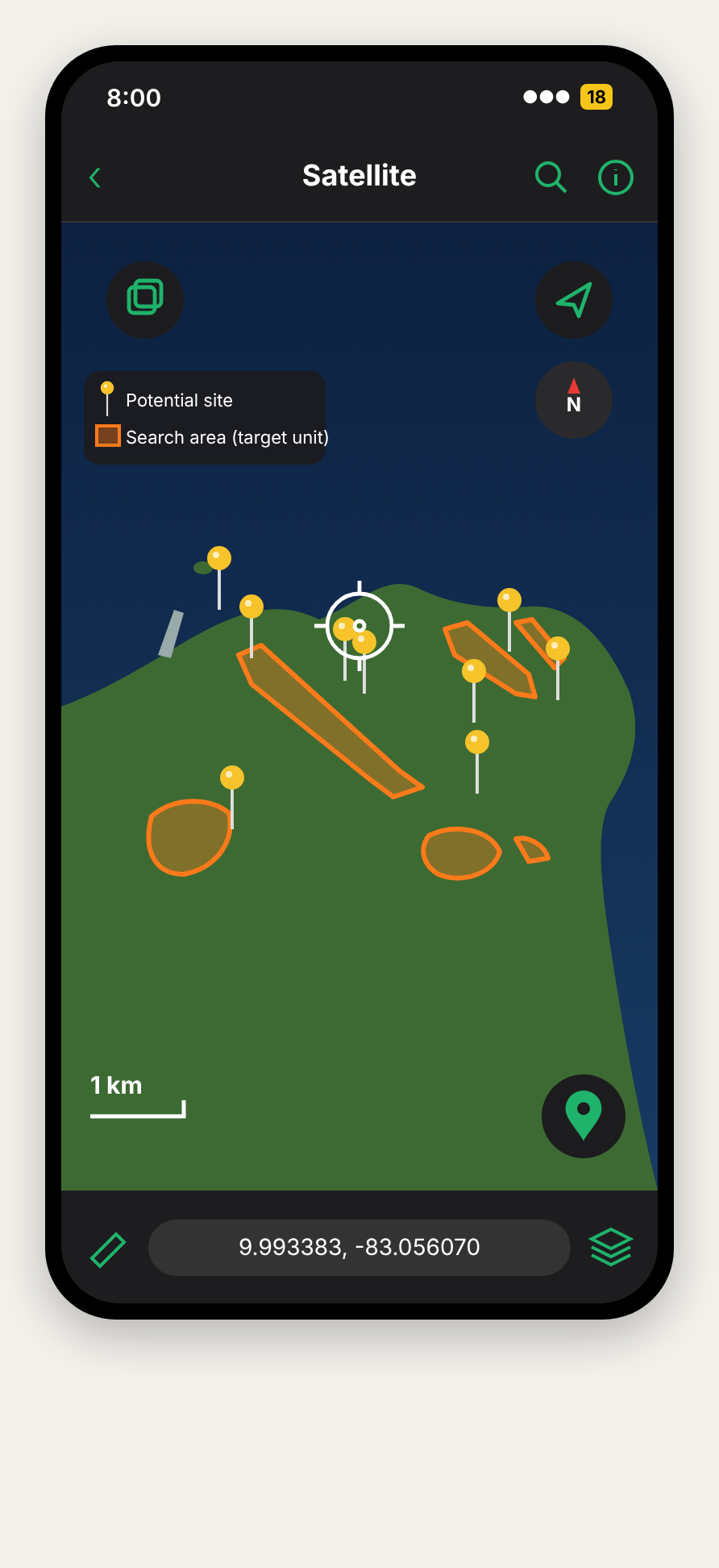
Planning mode: line-and-circle pins for sites to check out, and orange shapes for areas where the target unit should crop out.
I color code the pins by formation or lithology. Which one I choose depends on the scale I'm working at and the question I'm asking, so it changes from project to project. At a glance I can see what I've covered, what's left, and where the gaps are.
Avenza also lets you make folders and sort your points into them, which keeps things tidy once a project has hundreds of placemarks. You can group them by field season, area, formation, or whatever makes sense for the work, and find what you need quickly.

Sections I've actually measured, color coded by formation, with a recorded track showing how I got in.
Tracking how I got in and out
A lot of my work is exploration and bushwhacking, and the way in is rarely obvious the second time. I turn on track recording in Avenza so I have an exact record of how I got to an outcrop and how I got back out. I save those tracks and reuse them on return trips, and they are great to share with anyone heading out to the same spot.
What it costs
Prices below are in USD as of October 2026 and can vary by country, so double check before you buy.
Garmin inReach (device sold separately, billed monthly, all plans include SOS):
Enabled: $7.99/month (SOS, everything else pay-as-you-go)
Essential: $14.99/month (50 texts)
Standard: $29.99/month (150 texts, unlimited tracking)
Premium: $49.99/month (unlimited texts and tracking)
One-time activation fee: $39.99
You can suspend your plan between field seasons instead of canceling, which saves you from paying the activation fee again.
Avenza Maps (annual):
Free: import up to 3 of your own maps, plus placemarks and photos
Plus: about $34.99/year, recreational use only
Pro: about $169.99/year, and required for academic, commercial, or professional use. It adds shapefile import and export, custom symbology, and external GPS connections, which is what lets Avenza use your inReach coordinates. Avenza also offers academic and multi-device pricing through their sales team, so it's worth asking your institution.
If you're using Avenza for research, Pro is the tier you're actually supposed to be on.
FieldMove Clino is free on both iPhone and Android.
Up next
That's my core setup. In the next post I'll get into the other apps I lean on. If you have a field app you can't live without, send it my way. I'm always looking for new ones to try.

Comments